
Spotlight Alternatives in 2026: Which One's Right for You?

Spotlight has been the default starting point for Mac productivity for over two decades. It is built-in, lightweight, and incredibly reliable for basic math, opening an occasional application, or searching for a forgotten PDF.
But by 2026, the macOS launcher landscape looks vastly different. The tools we once used simply to "boot an app" have evolved into full-fledged operating layers. Some have expanded into heavy AI-powered search centers; others have doubled down on offline speed or specialized execution.
As these tools expand, they also start fighting for the same exact hotkey: ⌘ + Space.
If you are looking to replace Spotlight in 2026, the best tool depends entirely on what problem you are solving: Search, Automation, or Context Switching? Here is the source-verified teardown of the best alternatives on the market today.
The Contenders at a Glance
-
Spotlight
- Primary Philosophy: Lightweight local index search.
- Best For: Casual file finding & simple utility.
- 2026 Footprint / Feel: Native, passive, occasionally basic.
-
Raycast
- Primary Philosophy: Extensible modern command bar.
- Best For: All-in-one hub, integrations & clipboard.
- 2026 Footprint / Feel: Feature-dense, extension-heavy, subscription-leaning.
-
Alfred
- Primary Philosophy: High-performance scriptable launcher.
- Best For: Local file system hacking & custom workflows.
- 2026 Footprint / Feel: Lightning fast, native memory (<20MB), highly technical.
-
Assignee
- Primary Philosophy: Shortcut-first context switcher.
- Best For: Instant home-row workspace navigation.
- 2026 Footprint / Feel: Zero-overhead, muscle-memory driven, tactile.
1. Spotlight: The Native Search Default
Before replacing Spotlight, it is worth acknowledging what Apple has updated in 2026. Spotlight now benefits from deeper native Apple Intelligence integration, allowing you to ask natural-language questions like "Find the invoice my accountant emailed me last week."
The Strength:
- Zero Overhead: It consumes almost no active RAM and comes pre-indexed on every Mac.
- Apple Ecosystem Tie-In: Unmatched integration with native Apple Mail, Messages, and Notes.
The Friction:
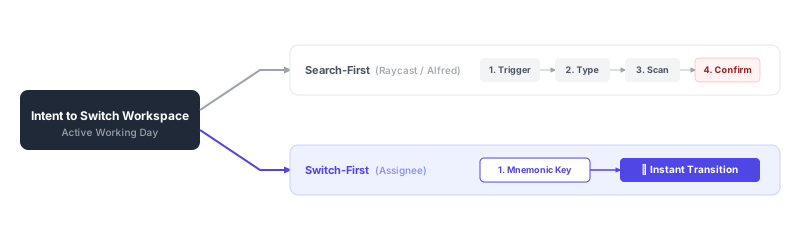
- The "Search Loop" Trap: Spotlight keeps every single interaction in the Type, Scan, Confirm cycle. You can never move a transition to pure muscle memory because the index results shift dynamically based on what files you modified recently.
- Extremely Limited Customization: Beyond launching apps, you cannot map API workflows or custom shortcuts directly.
2. Raycast: The Modern Extensible Heavyweight
Raycast remains the most popular upgrade path for general power users in 2026. It has successfully moved the launcher beyond file search and into a centralized team command bar.
The Strength:
- Extremely Rich Extension Store: Raycast’s React-based API has spawned thousands of community-built extensions. You can merge your GitHub pull requests, manage Jira tickets, control Spotify, and check Figma assets directly from the launcher.
- Built-in Power Utilities: Excellent out-of-the-box clipboard history, snippet expander, and system controls.
The Tradeoffs in 2026:
- Platform Bloat: Raycast has grown significantly. With built-in AI models, pro-tier team collaboration features, and continuous syncing, it can sometimes feel like a second browser running in the background.
- Still Search-Driven: Because it relies on fuzzy matching, jumping between two active windows still requires invoking the bar, typing
v-s-c-o-d-e, scanning the list, and hitting enter.
3. Alfred 5: The High-Performance Scriptable Veteran
While some predicted Raycast would completely overshadow Alfred, the veteran launcher has remained the absolute favorite for developers, sysadmins, and local automation purists in 2026.
The Strength:
- Incredible Speed and Native Architecture: Built on highly optimized native macOS frameworks, Alfred launches instantly and runs on a fraction of the memory footprint of modern Web-tech wrappers.
- Deeply Scriptable Workflows: Alfred's visual workflow builder is unmatched for complex local automations. If you want to feed query outputs through a shell script, parse JSON, and dump the result into a local database—Alfred is the gold standard.
The Tradeoffs:
- Deeper Learning Curve: Building or even installing custom workflows requires a Powerpack license and a willingness to configure custom triggers.
- Aesthetic Overhead: Out of the box, Alfred feels much more clinical than the modern, polished interfaces of Raycast or Assignee.
4. Assignee: The Mnemonic Switcher
Assignee is the most structurally distinct alternative to Spotlight. It exists because of a simple realization: 90% of our daily navigation is not searching for new files, but bouncing between the same 6 applications and projects.
Instead of forcing you into a command-bar text interface, Assignee builds a dedicated shortcut layer that maps directly to your physical keyboard.
The Strength:
- Instant Muscle Memory: You map stable single-key triggers on your home row (like
Afor Slack,S, 1for VS Code frontend,S, 2for backend). You never have to type a search query or scan a moving list. - Context and Window Level Switching: It switches you directly to the correct window or browser profile, not just the generic parent application.
- Zero Cognitive Load: It runs completely silently with no text bars, cloud indices, or AI models hogging your system.
The Tradeoffs:
- Not a Search Tool: Assignee does not search your file system or index your documents. It is designed to run alongside your local file searcher, replacing it entirely for your active workday transitions.
How to Decide: The 2026 Flow Chart
The easiest way to audit your workspace is to match your primary bottleneck to the correct tool:
- "I need one global search bar that handles clipboard history, snippets, and lets me inspect web integrations." 👉 Choose Raycast. It is the strongest all-in-one utility belt.
- "I have complex local scripts, prioritize raw execution speed, and want deep control over my local file system." 👉 Choose Alfred. Its native performance and workflow builder are unmatched.
- "I already know exactly where I need to go. I just want to jump between my editor, my browser, and my chat clients instantly without typing or scanning." 👉 Choose Assignee. It is the only option designed specifically to preserve your focus by bypassing the search loop.
- "My needs are incredibly simple and I rarely switch between complex active projects." 👉 Stay with Spotlight. The native defaults will serve you just fine.
Next Steps to Build Your Flow
- New to keyboard-first setups? Get started with The Beginner's Guide to Setting Up Your First Shortcuts in Assignee.
- Want a deep look at the math and speed comparisons? Read the detailed benchmark analysis: Spotlight vs Raycast vs Assignee: Which Is Fastest?.
- Curious about matching your physical layout to your tools? See How to Use Assignee Without Leaving Home Row.
- Evaluating licensing and tiers? Visit the pricing page.


